Roles, Permissions, and Groups
TourPro’s access model has two layers:
- Role defaults — every role starts with a sensible baseline of permissions.
- Per-user overrides — any individual permission can be toggled on or off for a specific member, regardless of their role.
Every permission in TourPro is fully customizable. Roles are a starting point, not a ceiling.
Roles
Eight roles ship with TourPro, each with different default access:
| Role | Typical Usage |
|---|---|
| Tour Manager | Full operational control |
| Artist Manager | Schedule, travel, guest lists, documents |
| Production Manager | Operations-wide edit access |
| Promoter | Guest list and show-day visibility |
| Artist/Performer | Broad visibility + guest list editing |
| Band Member | Schedule and travel visibility |
| Crew Member | Schedule and travel visibility |
| Venue Coordinator | Schedule and guest list read-only |
All Permissions
Tour Management
| Permission | Description |
|---|---|
| Edit tour details | Edit tour name, dates, and basic information |
| Delete tour | Delete the entire tour |
Team Management
| Permission | Description |
|---|---|
| Invite members | Send invitations to new team members |
| Remove members | Remove team members from the tour |
| Manage roles and permissions | Change member roles and permissions |
Schedule
| Permission | Description |
|---|---|
| View schedule | View tour schedule and events |
| Edit schedule | Create, edit, and delete schedule events (also covers advances) |
| Create events | Create new schedule events |
| Delete events | Delete schedule events |
| View tour activity | View the tour activity history |
Travel
| Permission | Description |
|---|---|
| View travel | View travel arrangements and details |
| Edit travel | Manage travel arrangements |
| View accommodations | View accommodation details |
| Edit accommodations | Manage hotel bookings and accommodations |
| Review confidential imports | Review AI flight imports flagged as confidential |
Guest List
| Permission | Description |
|---|---|
| View guest list | View guest lists for events |
| Edit guest list | Edit guest lists for events |
| Approve guests | Approve guests for events |
Notifications
| Permission | Description |
|---|---|
| Send notifications | Send notifications to team members |
Groups
| Permission | Description |
|---|---|
| View groups | View team groups |
| Manage groups | Create and manage team groups |
| Assign group permissions | Assign permissions to groups |
Documents
| Permission | Description |
|---|---|
| View documents | View and download documents |
| Upload documents | Upload documents to tour |
| Edit documents | Edit document metadata and details |
| Delete documents | Delete documents from tour |
Default Permissions by Role
| Permission | Manager | Artist Mgr | Prod Mgr | Promoter | Artist | Band | Crew | Venue |
|---|---|---|---|---|---|---|---|---|
| Edit tour details | ✓ | ✓ | ||||||
| Delete tour | ✓ | |||||||
| Invite members | ✓ | ✓ | ||||||
| Remove members | ✓ | ✓ | ||||||
| Manage roles and permissions | ✓ | |||||||
| View schedule | ✓ | ✓ | ✓ | ✓ | ✓ | ✓ | ✓ | ✓ |
| Edit schedule | ✓ | ✓ | ✓ | |||||
| Create events | ✓ | ✓ | ✓ | |||||
| Delete events | ✓ | ✓ | ||||||
| View tour activity | ✓ | ✓ | ✓ | |||||
| Review confidential imports | ✓ | ✓ | ✓ | |||||
| View travel | ✓ | ✓ | ✓ | ✓ | ✓ | ✓ | ||
| Edit travel | ✓ | ✓ | ✓ | |||||
| View accommodations | ✓ | ✓ | ✓ | ✓ | ✓ | ✓ | ||
| Edit accommodations | ✓ | ✓ | ✓ | |||||
| View guest list | ✓ | ✓ | ✓ | ✓ | ✓ | ✓ | ✓ | |
| Edit guest list | ✓ | ✓ | ✓ | ✓ | ✓ | ✓ | ||
| Approve guests | ✓ | ✓ | ✓ | ✓ | ||||
| Send notifications | ✓ | ✓ | ✓ | |||||
| View groups | ✓ | ✓ | ✓ | ✓ | ✓ | |||
| Manage groups | ✓ | ✓ | ||||||
| Assign group permissions | ✓ | |||||||
| View documents | ✓ | ✓ | ✓ | ✓ | ✓ | ✓ | ✓ | |
| Upload documents | ✓ | ✓ | ✓ | |||||
| Edit documents | ✓ | ✓ | ✓ | |||||
| Delete documents | ✓ | ✓ |
Customizing a Member’s Access
Any permission can be overridden for an individual member — you’re not locked into what their role provides.
- Open the Team tab in tour settings.
- Select Edit Permissions for the member.
- Choose their role to apply the default baseline.
- Toggle any individual permissions on or off as needed.
- Save.
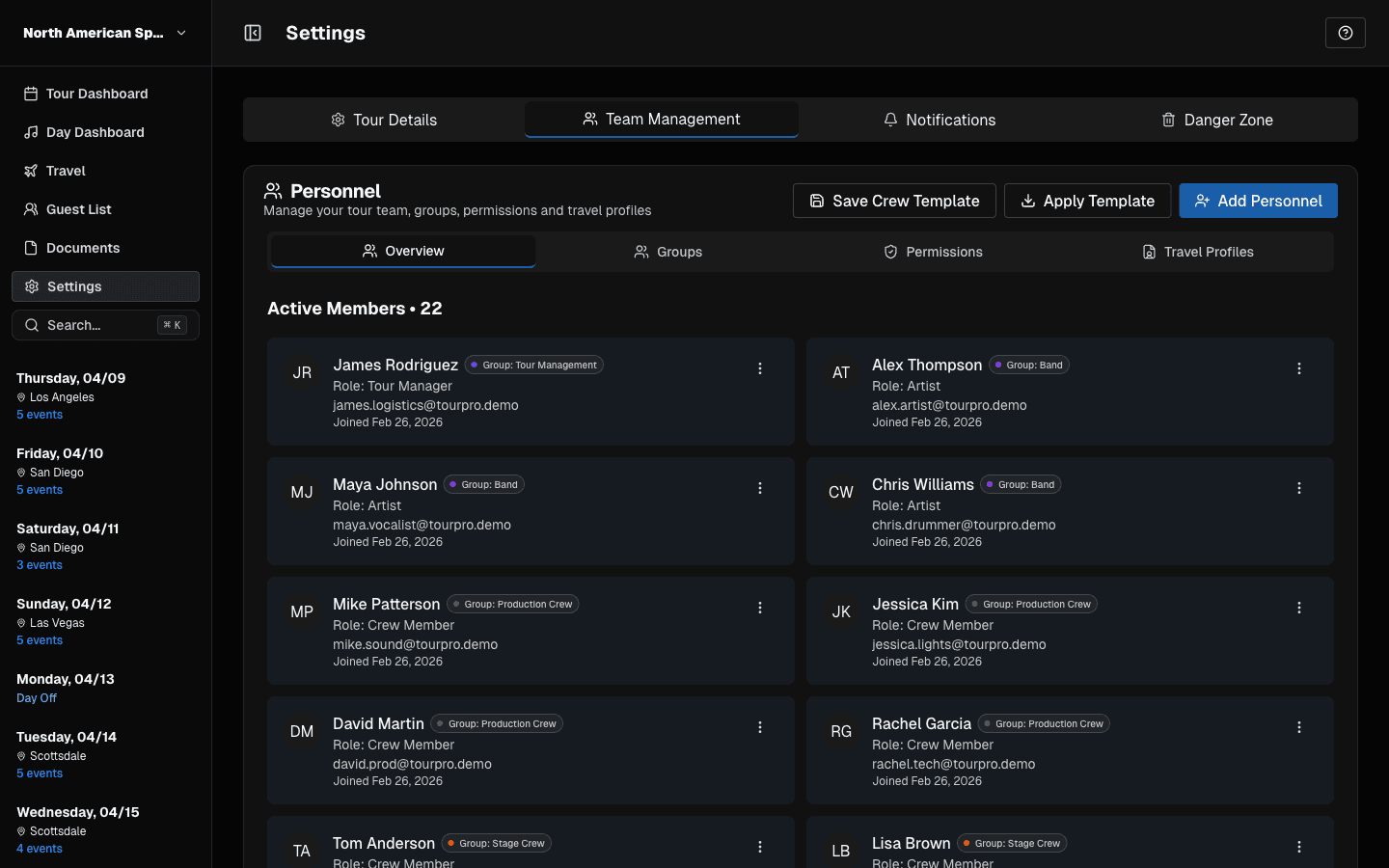 Use Team Management tabs to control permissions and group access.
Security Notes
- TourPro blocks users from editing their own permissions.
- Only members allowed to manage roles and permissions can change access for others.
Groups
Use groups to simplify recurring assignment patterns (examples: production, artist party, venue staff). Groups let you apply a shared permission set to multiple members at once rather than configuring each person individually.
Last updated on